Client Management RMR Management Discount Recurring Line
Discount Recurring Line (continued)
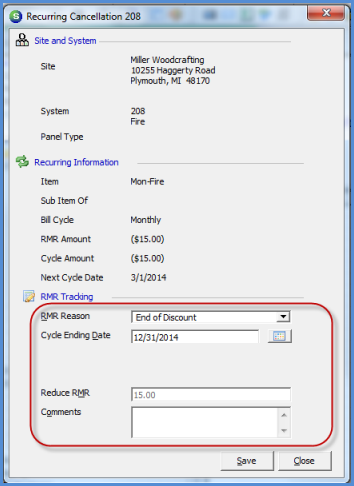
4. To end a recurring line discount with a future date, the discount recurring line will be canceled with future end date. Highlight the discount recurring line, right-click and select the Cancel RMR option. The RMR Cancellation form will be displayed. Select the RMR Reason Code from the drop-down list, and enter the Cycle Ending Date. The Reduce RMR field will automatically fill in with the monthly amount of the recurring line. You may enter comments into the Comments field if desired.
In the example below, the recurring line is billed monthly and the next cycle date is 03/01/2014. We want this discount to stop at the end of the year, so the Cycle Ending Date entered is 12/31/2014. If you were to enter a cycle ending date of 01/01/2015, the customer would bill for the remainder of the year plus one day in January 2015 before the recurring line would stop.
2787
Previous Page Page 2 of 2