SedonaSetup Operations Setup Tables/Options
Employees - Commission Rate Scale Setup
When setting up the employee’s commission scale rates may be manually typed into the grid or import the rate scale from different commission type rate setup from the same employee or use the rate setup from another employee’s commission type setup.
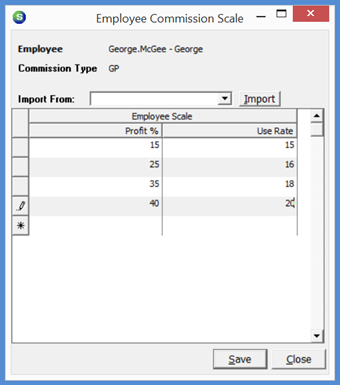
There are two columns in the Commission Scale setup; Profit % and Use Rate. In the first row of the grid, in the Profit % column, type in the lowest Profit percent the Job must produce to be able to receive a commission. In the Use Rate column, type in the commission percentage (of the Job Margin) that will be paid to the salesperson. Continue on to the next rows to enter the various commission rates.
In the example below, the job margin achieved must be at least a 15% margin to be paid a 15% commission to the employee. The next rate is a 25% job margin to receive a 16% commission. If the Job margin is between 15% and 24.99%, the commission percentage will remain at 15%. If the Job margin reaches 25%, the 16% commission rate will be used, and so on.
FRM 24157
Previous Page Page 6 of 7 Next Page