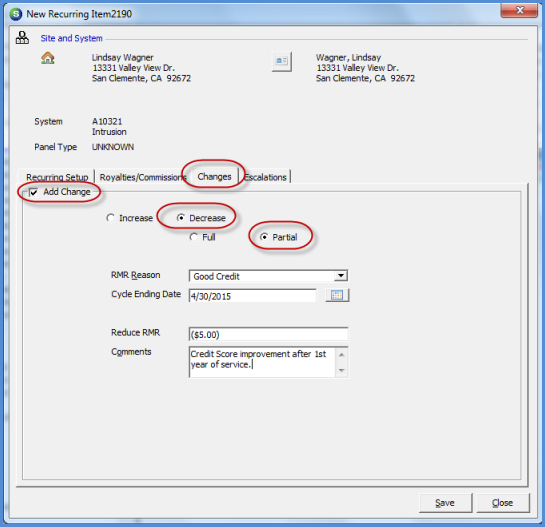
Client Management RMR Management Recurring Line Data Entry Form Definitions
Data Entry Fields for the Changes form
Future Rate Decrease (Partial)
When creating a new recurring line, you have the option of setting up a future rate decrease that is a Partial or a Full decrease type. The Partial option would be used if you are setting up a rate reduction. The Full decrease would be used if the recurring line will stop billing as of a particular date.
A Partial Rate Decrease is typically used when a customer begins services at a higher than typical rate due to a credit score that is below the company's normally accepted rate. After a certain period of time, you may automatically decrease the rate for the customer.
Decrease Type - Select the Partial radio button to setup a Rate Decrease.
RMR Reason - Select the RMR reason code from the drop-down list that identifies the reason for the Rate Decrease of this Recurring Line. This field is required.
Cycle Ending Date - Enter the date on which Rate Decrease will go into effect and begin billing for this Recurring Line.
Reduce RMR - Enter the monthly amount of the decrease with a negative value. If the current rate is $25.00 per month and the recurring line will decrease to $20.00 per month, enter the amount of -5.00.
Comments - This is a free form text field to enter comments specific to this recurring line rate decrease. This field is for information purposes only and will not print on the customer invoice. The User may enter up to 255 characters of information into this field. This field is optional. This comment is displayed in the RMR History record for the recurring line decrease.
2087
Previous Page Page 2 of 3 Next Page