.png)
Customer Explorer Active Pane Options Bill Contacts
New Bill Contact
To Create a new Billing Contact from the Active Pane, highlight a Bill Contact Name in the Active Pane, right-click then select the option New Bill Contact. If the User does not have the appropriate permissions, this option will not be available.
Note: If there are no existing Bill Contacts listed in the Active Pane, the first Bill Contact must be created from the Customer Tree by highlighting the word Contacts in the Bill To area of the Customer Tree; right-click and select the option New Bill Contact.
3503-01
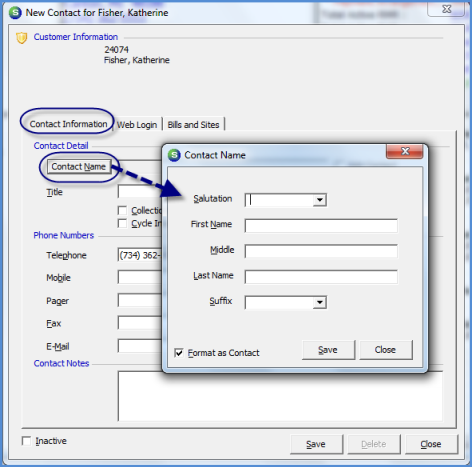
The New Contact form will be displayed. Click the Contact Name button to open the Contact Name form to enter the name information. Click the Save button when finished. The User must enter at least one telephone number to be able to save the Contact record. Once all information is filled in on the Contact Information tab, navigate to the Bill and Sites tab.
3503-02
Previous Page Page 2 of 6 Next Page