Client Management Customer Query Builder Designing a Report Query
Designing a Report Query (continued)
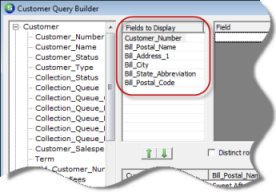
3. Select the data fields to be displayed on the report by either double-clicking on the data field or by dragging and dropping the data field into the Fields to Display area of the Query Design form.
ss3041
4. Next Filters will be added to the report query design. For the first filter, drag and drop the Customer_Status field from the Customer Data Group into the Filter area. The Relation field will default to “=”; do not change this selection. In the Criteria column select AR from the drop-down list then press the tab key on the keyboard.
For the second filter, drag and drop the Bill_is_Primary field from the Customer Data Group into the Filter area. Again the Relation field will default to “=”; do not change this selection. In the Criteria column select Y from the drop-down list then press the tab key on the keyboard.

ss3041-1