General
Ledger Account Register
Account Register
All financial transactions created
record to the GL Register table. Each transaction saved to
this table contains a unique Register Number. The
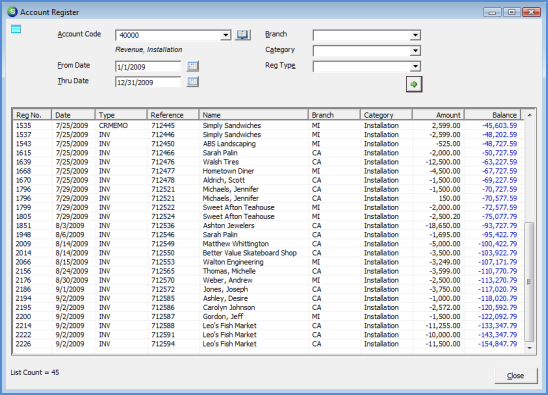
Account Register option with the General Ledger module, is used to view
transactions posted to a particular G/L Account or to check the
balance in the selected account as of a specific
date.
Once an account code (G/L Account
Number) has been selected at the top of the form and the User
presses the Refresh button  , all transactions for the selected account will be displayed
in the grid area of the form. The transactions listed display
several columns of information; refer to the Account Register Data
Columns page for definitions of each
column displayed in the grid.
, all transactions for the selected account will be displayed
in the grid area of the form. The transactions listed display
several columns of information; refer to the Account Register Data
Columns page for definitions of each
column displayed in the grid.
The data displayed in the grid may
be re-sorted by clicking on the header name of the columns.
There are several selection
options and filters available at the top of this form; please
refer to the topic Account Register Filters and Options for more
information.
5001
Page 1 2 Page
1