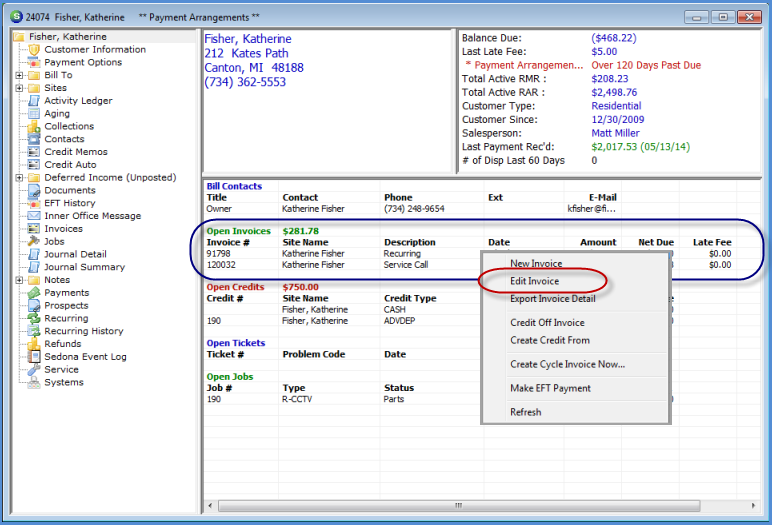
Customer Explorer Active Pane Options Open Invoices
To Edit an Invoice from the Active Pane, highlight an open Invoice, right-click and select the Edit Invoice option. The Invoice form will open for editing. If the User does not have the appropriate permissions, this option will not be available.
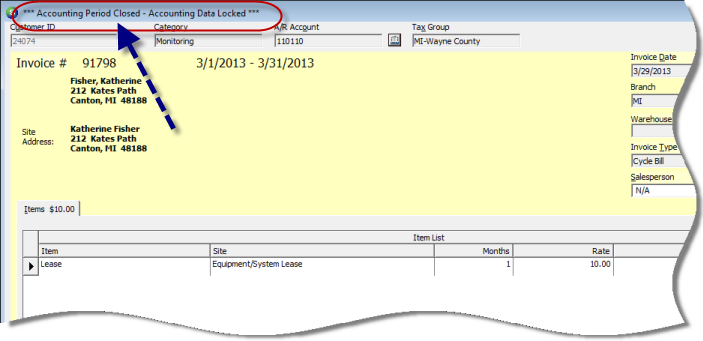
Note: 1) I an Invoice has been partially paid or if the accounting period for the Invoice has been closed, a message will display in the Invoice banner stating the accounting data is locked. 2) Job invoices may not be edited; the entire invoice must be credited and re-invoice through the Job Billing process.
3514
3514-01
Previous Page Page 3 of 9 Next Page